Wednesday, August 31, 2011

Make Wood Grain Vector Art in Illustrator

Today I would like to show you how to create your own wood grain vector art in Illustrator.
You can change the colors to your preference for your design.

1st open illustrator create the size page you want to make the wood grain, below is the tools you will be using:
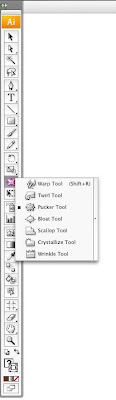
Next select the rectangle tool and draw a thin rectangle the length of the page then select the rectangle and hold the option shift then drag this will copy the exact one below it. Continue until the whole page is full of lines:
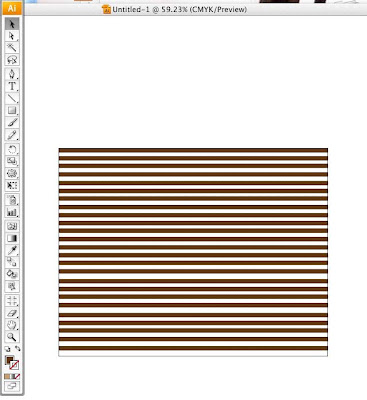
Next select all the lines and go to the Object tab>Transform>Transform Each, type in these settings:
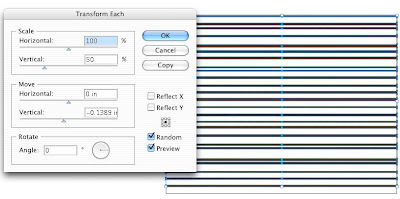
This makes the lines different sizes. Next select the warp tool double click it and put in these settings, this will distort the lines when you run the brush over the lines from left to right:
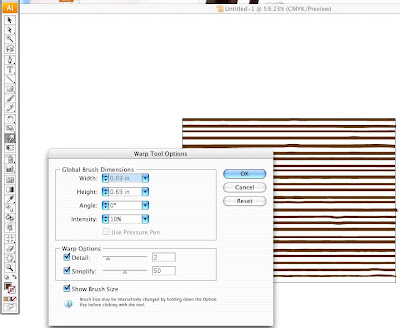
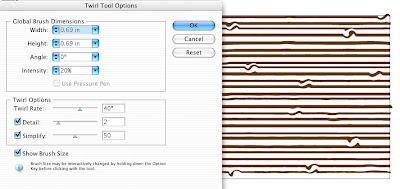
Next select the twirl tool put in these settings and lightly tap the brush over the lines in different places to twirl the line slightly:
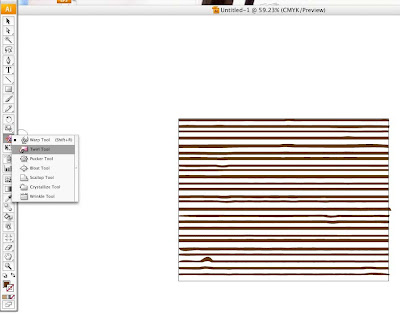
Next choose the pucker tool use same settings as before then run the brush over the lines to contrast and pucker them to your liking:
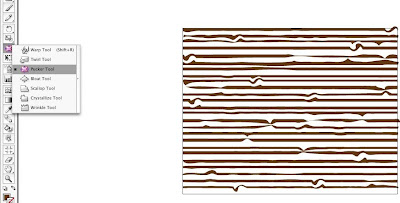
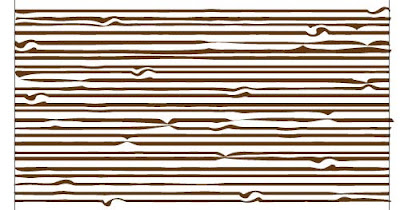
Next select all and pull down from the top to scrunch it together into thinner shapes:
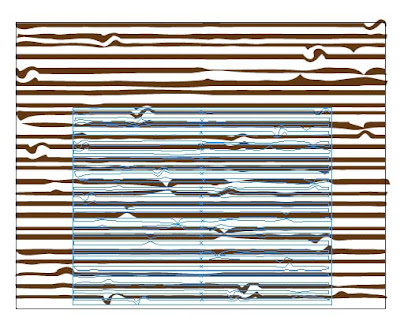
this is how it looks after scrunching it, next draw a retangle box over the top of the lines with a lighter color and send to back:
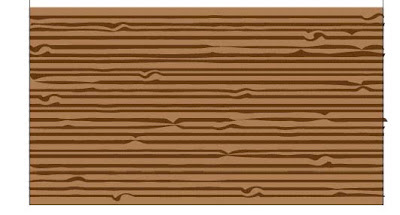
There you have it your own homemade wood grain vector art from Illustrator. Have fun and be creative!

Thursday, August 18, 2011

Quick Mask Mode in Photoshop

Hello out there my blog readers!

I just learned a cool trick in photoshop, I thought I would share it with you along with some photos of what I did. It is the Quick Mask tool.

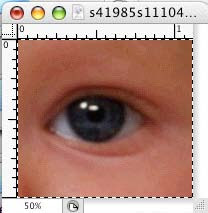
First open a photo I used an eye just to try it out.

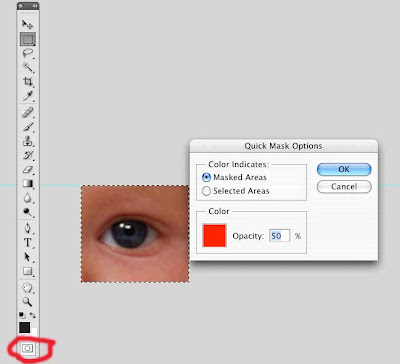
Next double click this box on your tools pallet, another pallet will pop up so copy my settings.

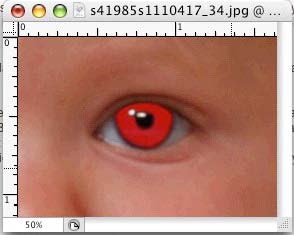
Now you are ready to paint the eyeball with the brush tool by selecting B on your keyboard then you can use [ to make brush go up in size and ] to make the brush go down in size. Now paint the eye around the iris it will show up red when you do this like the photo below:

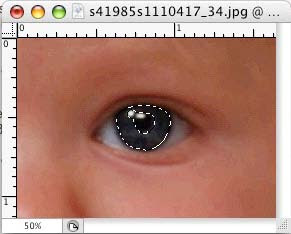
Next you can press the Q key on the keyboard again to go back to standard mode, this will put whatever you painted into selection mode, next go to the select tab at the top and scroll down to inverse.

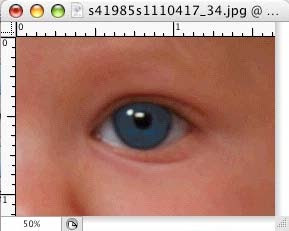
Now go to the Image tab scroll to adjustments then to Hue/Saturation. Make sure the preview is on so you can see how the image looks when you start playing around with the setting to achieve what you want the eye to look like as my photo below
Now you know how to use the quick mask mode to change eye color. Cool hu?

Monday, July 11, 2011

Social Networking....Does it work for you?

I was recently talking to some people about how Facebook works for them. Some business swear by Facebook and others do not receive any added business using Facebook. Why is that? I think the younger people (thumb people) the ones that use the internet for everything from telling time to looking up a phone number or map are the ones more likely to use Facebook to find a business or deals.

The businesses that are geared toward an older generation or most of their client are the older generation do not really get anything out of Facebook. Take for example a business that sells hearing aids. Most people who may need a hearing aid are in the older retiree generation. Few are younger like my age or children.

I know that technology is the way to go these days, like scanning QR codes for deals and or coupons at a store on your smart phone. My mother in-law does not have an email or even know how to use the computer. She has never searched the web. She would be in the category of the retired generation. She looks for deals and ads in the Newspaper or mailers.

So just by the type of business you have should determine the market you want to reach out to. Let Clinton Press help with those marketing needs. We can create a marketing strategy to generate business to the different clients you may have.

Also Facebook has worked for us at Clinton Press. It really helps to generate business, especially with a promotion or also when we send out an email blast.

Have a great week!

Monday, June 13, 2011

Sharing Fonts Illegal

Hey everyone,
I recently had a client that was looking for a font, because theirs had become corrupt. We do not know why but he had upgraded to a newer macintosh. The fonts would not load so he sent them to me. I was also unable to use the fonts.

I was thinking since this is a print shop, we receive fonts all the time for print jobs. I sent an email to my graphic designer friends since I was just going to need the fonts to print the job. I actually had one person reply to me that he had the font I was looking for.

In the meantime another client emailed me and said it was illegal to share fonts. Being a print shop and only using the fonts for the printed job, I assume that it was okay. I am not really sure how that applies to a printing company. Most of the fonts are thrown out once used for that job. I wasn't trying to do anything illegal, especially when it comes to the company I work for.

I was wondering if anyone has any information about "borrowing a font" that is just what we did. I like to help out my clients as much as possible for the prepress part, or just educating them with the experience and knowledge I have gained over the years. Any input would be greatly appreciated. Thanks and Have a great Day!

Monday, April 18, 2011

QR Codes a funky looking barcode


Have you been seeing the new funky looking square codes lately everywhere? Well we have been getting alot of clients printing with the QR code on it. It is only going to pop up even more. It is the new wave of technology at least in the USA.

Here is what it looks like:


QR codes have been used for years in Japan. I think they used it to track inventory on auto parts. So now we have this wonderful code that is 2 diminsional and can store tons of information. The neat thing about it is you can create it yourself for free. Just google QR code creator and there are lots of sites that let you create it for FREE. We love free.

Here are a few ways people are already using it now:
Stores or retails may have the QR code and when you scan with your cell phone you will receive a coupon right there on the spot.

Small businesses are putting it on there website or business cards. If you put it on the business card you can basically have someone scan it and you can put your contact information and the person who scans it can easily store your info in their phone. Or it can take you directly to their website. Pretty Awesome Hu?

You can use QR codes to take a shortcut to contact, product, coupons, offers, twitter, facebook, linkedin, event details, etc. The possibilities are unlimited. Check it out. What a great way for a small business to send detailed information with the blink of an eye about them!

Monday, March 21, 2011

Trends of the Future

I would like to share a website with you today. It has some really interesting articles on it.
http://thefutureofthings.com.

I recently read about xerox developing a new inkless printer which sounds so cool and unbelievable. This article can be found here:
http://thefutureofthings.com/articles/50/xerox-inkless-printer.html

They say it uses a light source and can last right now from 16 to 24 hours. Xerox has developed a special paper which can be used over and over. At this stage in the testing they said it can be re-used up to 50 times.

Wow wouldn't it be nice to have this technology in the future, imagine how green it will be and also you wouldn't have to have boxes and boxes of recycled paper in the office. I know we recycle tons of paper here at Clinton Press. This new technology is not yet available and they are still working on it. Xerox says it will be a few years off. Check out the article it is truely an amazing trend of the future!

Monday, March 14, 2011

Variable Data

Did you know that we have the capabilities to do variable data (personalization) on envelopes, letters, brochures etc. All you have to do is send Clinton Press a database with your names and addresses of the customers you wish to personalize printed items with.

It is a great and wonderful marketing tool. We can do 4 color process envelope and put your different addresses on them and the letters to match. All you have to do is stuff the letters or have us stuff the letters and mail it out.

The variable data industry is a fast, personal way to reach your customers individually. How about maybe doing a few notepads with a person's name and phone on it. It could be done the exact same way with your database.

Variable is the new wave of the future when it comes to printing. So call us today and ask about variable data options. Have a great week!

Monday, March 7, 2011

New Studies Show Facebook a Powerhouse Marketing Tool

I just recently read a very, very interesting article about marketing tools for social media.
I am including a link to show the studies comparing Facebook, Yahoo, Google, etc. It stated that the average time spent on Facebook per person in January was 7 hours.

It also shows an example of fan base for a company's Facebook page and how the study concluded that the number of fans grew the business. I am going to try that next. We need more Fans on the Clinton Press Facebook page. Come check us out!


Here is a link to the interesting article:
http://www.socialmediaexaminer.com/5-new-studies-show-facebook-a-marketing-powerhouse/

Wednesday, November 3, 2010

Problems with Photoshop files

Good Morning,

I know it has been awhile since I have blogged. I have been extremely busy at work these day. We have a new sales lady and tons of work. So today I have a few minutes to finally write.

I want to talk about a file I received a couple of weeks ago. It was a very unique and different pocket folder design that came in. I have never seen one like it. The designer was trying to achieve a 1 color pocket folder design. But the files were in photoshop in cmyk. I had to explain to the designer when doing 1 color it would be best to do a monotone or to draw the design in illustrator to be able to control the shading and gradients and the color better.

The pocket folder had to match in 3 places so it had to be broken down and the designer had to go back and get her to design it in illustrator. That way we could use the one color pms design in 3 spots on the pocket folder so that when it folds up and together, all images overlap and meet and match up in the same place.

So if you want to use a pms color with a line drawn design do it in illustrator it will save you time and frustrations when you send it to your printer. Vector art is always better if it is a drawing and not a photo.

Thanks and have a great day!

Monday, September 27, 2010

HOW TO REMOVE AN IMAGE FROM A PDF

Happy Monday,

Every now and then I get a pdf file that may need something taken off of it. For example, crop marks, color bars or page information. Sometimes we may need to remove some text or an image from the pdf.

If I am lucky I receive a pdf that I can do that to. Here are step by step instructions of how to do this. Some pdfs will work this way and some do not. Just try it out to see if it works for you. It is actually a wonderful tool to have if you need to manipulate a pdf file.

First open your file in Adobe Acrobat Pro I use 9 most will work as long as it is pro versions. Next go to the Tools Tab at the top, scroll down to Advanced Editing and over to Touch up Object Tool. Next hold down the command, option, shift buttons and select the item you wish to remove from the pdf.

You will see a box around that item, now press the delete button, it should disappear from your pdf. This is a great option to use on pdfs for minor changes! Have a great week!

Nikki :-)

Tuesday, September 21, 2010

Indicias

Good Morning my friends,

Okay we have been completely swamped lately so therefore I am a week or two behind on my blogging. But I am back and want to talk about Indicias today. There are a few regulations when it comes to putting one on your mailing piece or envelopes.

First of all you need to talk to your printer to decide if you will be using their mailing services. If so they will probably put their own Indicia on the mail piece before printing it. But if you already have your own number and Indicia made up just let your printer know.

There are a few different ones depending on how you will mail the printed item.

First Class Mail - Presorted looks like this but of course you would use your own number or the printing company would use theirs: It is 200% of actual size so you can see it better.
The real size is .875 x .875.

Next is the Presorted Standard -Class Mail (This used to be Bulk Rate Mail, but the term bulk could not be used after 2001)
Next and last one we usually use is the Non-Profit Organization Indicia, you must have your own Indicia mailing number for the non-profit company you are with.
So if you have any questions contact your printer or local post office. Thanks and have a great week.


Friday, September 3, 2010

Variable Data

Happy Friday!
Happy Labor Day Weekend also, I hope everyone has a safe one, wherever you may go! I learned something new this morning while working with my variable data program. As you know we have the capabilities to personalize your printed mail and other printed items at Clinton Press.

It really and truly is a wonderful thing to do and a lot of companies are going this route. Only one catch, you have to have a pretty accurate database from Excel to go with it and that is what makes the variable data work.

We ran into a problem trying to figure out how to triplicate names in an Excel Database. Well after one whole day of trying it wasn't working the way it should. (If any of you out there know how to make a name appear 3 times vertically please let me know it would be very helpful in the future). So Clint had the idea of making multiple pages in a document and so after thinking and trying I did just that.

Basically I copied the page into my pdf variable file 3 times. Then I copied and pasted the variable data blocks to each page. Wow, after composing the file it actually made 3 of the same names in a row over and over until it reached the end of the database. Thanks Clint for the idea, it worked! Sometimes 2 or 3 brains are better than 1! Yay!

You are probably wondering why we needed the file triplicated anyway, well we were running variable data on carbon copy collated sheets (pink, white, yellow). The sheets come collated in the color order and we needed to print the same information on pink, white, and yellow sheets.
That way it would stay collated and in the exact order that the customer sent in the database by department and alphabetically.

Contact us if you would be interested in doing some variable data printing, it really is an awesome thing! Have a great weekend!
Nikki McDonald

Friday, August 27, 2010

A Day in the Life of a Prepress Department

I apologize to my people and fans and followers for not posting in a couple of weeks. It has been hectic and crazy busy here in Greensboro at Clinton Press. And that is exactly how we like for it to be, busy.

So I will share a little about what we have been up to. Lots of designing going on these days in prepress. We have a new saleslady and she is doing well, she has brought in a few design jobs. The design jobs take a little longer than our normal jobs sent in by ad agencies or graphic designers or our clients.

We have tons of work all over the plant so therefore some days our prepress department, Kathy and I have to go to other areas of the printing company, mostly bindery. We are very well rounded and experience in most all places of the plant. Kathy is the girl that does everything. She is my partner in prepress, she handles the proof making, plate-making, etc.

On top of all that she answers the phones, writes job jackets does billing, shipping in the shipping department, she is the go to girl for Clint Jackson our boss and owner of Clinton Press. Thank God for Kathy Shelton I don't know where we would be without her.

We have also been trying to find a prepress person to take my place for 6 weeks maternity leave somewhere around December. I am due during that time. We plan to have everything running smoothly, so not to worry. You will still get your jobs on time in the same professional manner and beautiful print quality, as always. Yes we have been busy at Clinton Press! YAY! I will make sure to get back to my regular posting schedule.

Have a great weekend!

Tuesday, August 3, 2010

Introducing Our New Saleswoman at Clinton Press

Good Morning Everyone!
I would like to introduce you to the newest member of our team at Clinton Press.
Her name is Kerri Lindley. She will be a wonderful addition to Clinton Press, we are very excited to have her. Here is a little bit of her background:

Current
  • Owner at KCL Creative
  • Star Alliance at Broach and Company
Past
  • Contract Graphic Designer at SLAM, Inc.
  • Graphic Designer at Crago and Company
  • Contract Graphic Designer at Genre
Education
  • Appalachian State University

Public Profile

http://www.linkedin.com/in/kclcreative


Kerri is a graphic designer and now will be a graphic print specialist with us at Clinton Press. Stop by and meet Kerri today!


Wednesday, July 21, 2010

Overprint Settings in Indesign

Good Morning Everyone!

I know it has been a couple of weeks since I have posted on my blog. I have been extremely busy here at work. (A great thing!) When I wasn't busy I was trying to get as much information about intelligent barcoding for mailing pieces. There is so much information on it, I have to check everything out.

Enough excuses hu? Today I am going to tell you about overprint settings in Indesign. I recently received a job from a client this week with some overprinting going on in the file. They left me a long list of things they checked out and couldn't figure why the logos were still overprinting.

First thing I did was open the Indesign file and open up the separations palette, after clicking on each color to turn it off, sure enough the logos were overprinting.

So I went to the window tab at the top and scrolled down to attributes. This will pull up your attributes palette. Next I ungrouped the logo which had 20 different pieces in it. Next I selected each color one at a time. Just precautionary measures, and deselected the overprint button in the attributes palette. All colors were selected to overprint. If you run into a problem with overprinting, just check out the attributes palette it is a wonderful tool. This tool is in Indesign and Illustrator, I use it a lot.

Woohoo! Another prepress problem has been once again solved. I called the client just to let them know what the problem was and also to share with them the tools and knowledge for the future. The client was very appreciative for that knowledge.

Have a great week, we are half way to the weekend!

Thursday, July 1, 2010

Our new E-Press and Variable Data Mail Merge


Happy July 4th early my friends!

I know I have told you about our new E-press before and also our variable data mail merge. But since you may not know the wonderful capabilities I will give you a little insight today. The E-press can print 4 color envelopes with a mail merge at the same time.


For example if you have a 4 color envelope and would like to print individual company names or personal names on the envelope along with the mail barcode and save a ton of money, you would definitely like to talk to us about the opportunities on the new E-press.

We can take your mailing list and print each name on the letter and/or envelopes to match, we do it all right here in house. Both sides of the envelope can be printed. Below are a few samples of envelopes we have printed:


There are many more cost effective ways to print these mail merge envelopes and letters for you. Please come by or give up a call to set up your next mailing project!

Have a safe 4th of july and remember to keep all of our men and women fighting for our country in your prayers!

Tuesday, June 22, 2010

Make A PDF from a Word Mac File

Sometimes I find myself needing to make a pdf from a Word File on the Macintosh. I do not recommend making a pdf from word because when you use word files it automatically reduces the resolution of any graphics, etc. to 72 DPI, low resolution. But sometimes that may be all you have.

So today I will explain how to make a pdf out of a word file: Open your word file and hopefully all of your fonts will be loaded to match.

• Next click the File tab at the top left

• Then scroll down to select the Print tab

• At the top you will see a Printer tab Select the tab and
choose Adobe PDF 7.0 or 9.0 whichever is available to choose

• Next at the bottom left choose the PDF buttom and select
Save as a PDF tab

• Next it will ask you where you want to save it

• Now Press the Save button at the bottom right

• Now you have a high resolution PDF of a low resolution word file

Hope this helps you with word files, Have a wonderful week!

Wednesday, June 9, 2010

Variable Data

One of the coolest new technologies out today is Variable Data...of course we have that at Clinton Press. If you are not aware of what Variable Data is, I will give you some examples of what we can do for you and your company.

We can print your 1, 2, 3, or 4 colors and even more envelopes along with a database of mailing list. All this can be done at the exact same time. So each envelope would have a different name, address, and zip for every one. It saves time and money on printing specialized envelopes with a mailing list.

We can print different serial numbers to identify each printed piece individually. For example if you print CD covers and sell them. To prevent fraud and reselling of your licensed or copywrited item, we put variable data in special places on the piece. As it prints out the number changes on each and every one of the printed CD covers. That way you can tell if someone out there is copying your printed pieces.

The same can apply to artwork, if you are printing art and would like to identify each print by a special number, that can be done also. What if you want to send your clients a special letterhead personalized with their first names on it. That is also variable data. You can even design a notpad and have every 100 of them print a different photo and or name, logo, etc. This is a great idea for promotional items or christmas gifts for your clients.

Call Clinton Press today and talk to us about how Variable Data can help you and your company . Have a great week! Nikki

Wednesday, June 2, 2010

Clinton Press FTP Site Instructions for Mac and PC


FTP Site Instructions for Macintosh

You cannot log on the FTP site with Internet Explorer!

To place files on Clinton Press FTP site from a Macintosh platform:

Use a program called FETCH or you can

get a free FTP client program at: http://filezilla-project.org/

type these items in the fields as shown below:


Host: ftp.clintonpress.com

User ID: ftpuser

Password: FTPftp1028


You will be connected and can upload your files.


FTP Site Instructions for PC Users

You cannot log on the FTP site with Internet Explorer!

From a PC platform, use Mozilla or you can

get a free FTP client program at: http://filezilla-project.org/


Have a great week! Nikki

Tuesday, May 25, 2010

Cool Website for Identifying Fonts

Happy Tuesday and early Memorial Day!

I came across this wonderful website a while back. It has come in handy so many times it is unreal. I have recommended it to several graphic designers, customers, etc. How many times have you gotten stuck on trying to match a clients fonts....

The client wants you to match their fonts, but they do not know the name of it and you are not sure what it it either. Well thanks to the wonderful grand website call Identifont, I am able to almost, always trace down a font or even a very similar look a like.

Wow, thanks Identifont! You guys rock, the makers of the Identifont website are wonderful people and their website is a very helpful tool in my field. Check this website out, I am sure you will love it. You might want to put it in your bookmarks, because I promise you will go back to it over and over again.

The website goes through a series of questions about the font you are trying to match and in the end it will give you a list of fonts that could match, then you can scroll through to find the one that is the closest by the sample of the fonts the website displays.

www.identifont.com

I hope you enjoy this website as much as I do. It will be a very helpful tool for those of you stuck on trying to figure out what a font's identity is. Have a great week!